



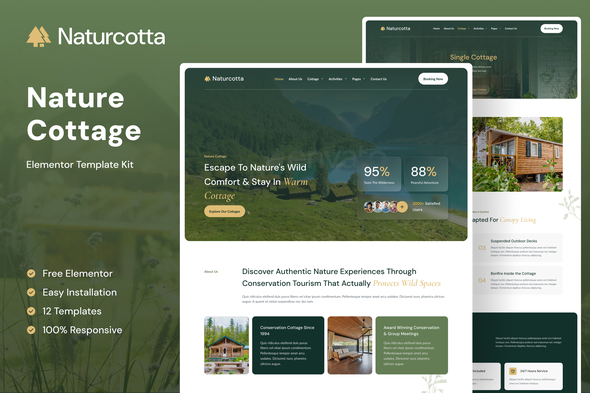





Naturcotta – Nature Cottage Elementor Template Kit
Template Kit Type: Envato Template Kit

Apple Shopping Event
Hurry and get discounts on all Apple devices up to 20%
Sale_coupon_15
توضیحات محصول
Naturcotta is an Elementor Template Kit for luxury nature cottages, rustic retreats, and unique glamping accommodations. This comprehensive kit is designed for property owners and travel agencies who need to build a serene and trustworthy online presence. With an organic, earthy design and essential sections for listings, retreats, and booking forms, you can showcase your exceptional natural escapes. This template bundle supports a responsive mobile view.
Please see the demo link for more information on this template kit and enjoy the design.
*Templates *
- Homepage
- About us
- Contact us
- Cottages
- Single Cottage
- Activities
- Single Activity
- Our Guides
- FAQ
- Blog
- Single Post
- Error 404
Required Plugins installed with kit
- Elementor
- Ultimate Addons for Elementor Lite
- MetForm – Custom Form Builder for Elementor
- Gum Addon for Elementor
- Jeg Kit for Elementor
How to Use Template Kits:
This is not a WordPress Theme. Template kits contain the design data for Elementor only and are installed using the envato Template Kit Import plugin for WordPress or directly through Elementor.
Detailed Guide:
For further support, go to Elementor > Get Help in WordPress menu.
How to setup header in Jeg Elementor Kit plugin
If you have Elementor Pro, setup headers and footers in Theme Builder. Pages you create with Elementor must have the Page Layout set to Elementor Full width for the global header and footer to appear.
- Go to Jeg Elementor Kit menu item > Header Template
- Click Add New Header
- Add condition > All Site and click Create
- Click the pencil icon to Edit and elementor will appear
- Click gray folder icon to access My Templates tab
- Insert the header template.
- Customize and Save.
How to Import MetForm Custom Form:
- While edititing a page where a form should appear, open the Elementor navigator to locate the Metform widget.
- Click Edit Form in the builder panel.
- Select New, leave blank selected then click Edit Form button.
- Click ‘Add Template’ grey folder button.
- Click ‘My Templates’ tab.
- Choose your imported MetForm template, then click ‘Insert’.
- Once the template is loaded, click ‘Update’.
Images:
This Template Kit uses demo images from Envato Elements. You will need to license these images from Envato Elements to use them on your website, or you can substitute them with your own.
نظرات مشتریان :
.فقط مشتریانی که این محصول را خریداری کرده اند و وارد سیستم شده اند میتوانند برای این محصول دیدگاه ارسال کنند.



















دیدگاهها
Clear filtersهیچ دیدگاهی برای این محصول نوشته نشده است.