PROPERTIES
| Primis |
|
|---|---|
| Colour: | Ultricies senectus |
| Dimensions: | Hhimeos: 23 cm, Eleifend: 53 cm, Ullorper: 15 cm |
| Wolutpat: | 3.2 kg (vestibulum mus) |
| Mus nostra: | 34,2 cm |
| Netus dolor: | Yes |
| Facilisi: | No |
| Dignissim: | 216364 |

| Primis |
|
|---|---|
| Colour: | Ultricies senectus |
| Dimensions: | Hhimeos: 23 cm, Eleifend: 53 cm, Ullorper: 15 cm |
| Wolutpat: | 3.2 kg (vestibulum mus) |
| Mus nostra: | 34,2 cm |
| Netus dolor: | Yes |
| Facilisi: | No |
| Dignissim: | 216364 |
09916666508

 گارانتی پرشین سافت
  ضمانت برگشت وجه در صورت هر مشکل
 **توضیحات**
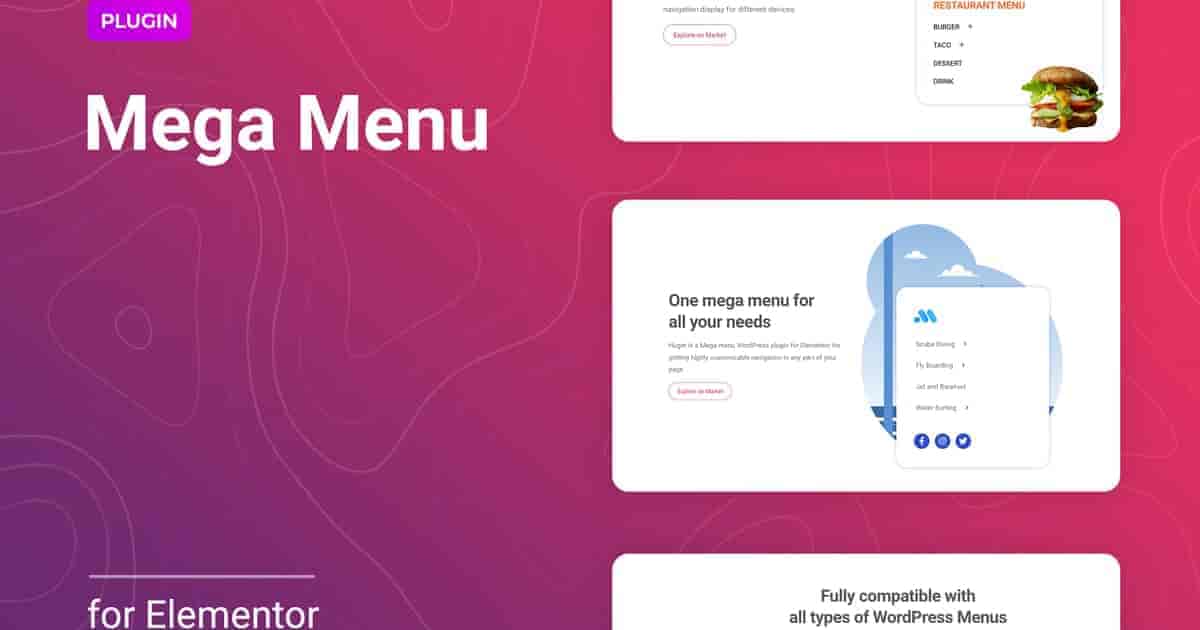
**Huger** یک افزونه **منوی مگا (Mega Menu)** برای المنتور در وردپرس است که به شما امکان میدهد **ناوبری بسیار قابل سفارشیسازی** را در هر بخشی از صفحه خود داشته باشید. این افزونه دارای **تنظیمات ساده و انعطافپذیر** برای ایجاد یک منوی **شفاف، کاربردی و گسترده** برای سایتهای مختلف است تا کاربران بتوانند تمام اطلاعات مهم را سریعتر پیدا کنند.
این افزونه به شما اجازه میدهد از **قالبهای المنتور** به عنوان منبع استفاده کنید، به این معنی که منو میتواند **هر نوع محتوایی** را در خود جای دهد. علاوه بر لیست معمولی با عناوین آیتمها، میتوانید **ساختار مورد نیاز عناصر منو** را با **تصاویر، ویدیوها، عناصر تعاملی، نوار جستجو** یا سایر موارد لازم ایجاد کنید. **هر ویجت و شورتکدی** را به بلوک منوی مگا اضافه کنید. این یک راه آسان برای داشتن **جهتگیری افقی یا عمودی** در چند کلیک است. آیتمهای منوی اصلی را مستقیماً از **ویرایشگر المنتور** مرتب کنید.
یک **منوی چندسطحی** با تنظیمات انعطافپذیر برای هر سطح راهاندازی کنید، **انیمیشن اعمال کنید** و موقعیت نمایش را از طریق گزینههای **افست (Offset)** تنظیم نمایید. تنظیمات **واکنشگرایی (Responsiveness)** به شما امکان مدیریت نمایش ناوبری برای **دستگاههای مختلف** را میدهد. **آیکون بازشو (Toggle Icon)** را برای منوی موبایل انتخاب و موقعیت آن را مشخص کنید، **پسزمینه منو** را اضافه و سایر گزینهها را سفارشی کنید. هر آنچه برای ایجاد یک **منوی مگای کاربرپسند و منحصربهفرد برای موبایل، تبلت یا دسکتاپ** وبسایت خود نیاز دارید، وجود دارد.
ما اطمینان حاصل کردهایم که شروع کار با Huger برای شما آسان باشد. با این افزونه، **۵ قالب منحصربهفرد، استایلیزه و آماده استفاده** دریافت میکنید. اینها تنها نمونههایی هستند که میتوانند شما را برای خلق سبک خودتان الهام بخشند. این به شما یک **شروع سریع در چند کلیک** میدهد.
**تنظیمات استایل دقیق برای هر عنصر منوی مگا** به دستیابی به نتیجه مطلوب کمک میکند. شما میتوانید **اندازه، تایپوگرافی، رنگها، پسزمینه، حاشیه (Border)، افست زیرمنو، استایل دکمه بستن** و موارد مختلف دیگر را مدیریت کنید. امکان **اعمال استایلهای مختلف برای حالتهای مختلف آیتم منو** مانند حالت عادی، هاور (Hover) یا فعال (Active) وجود دارد.
**Huger for Elementor** به طور استثنایی با **همه مرورگرهای مدرن سازگار** است. مهم نیست کاربران سایت شما را با کدام مرورگر مشاهده میکنند: **Chrome، Firefox، Opera، Safari یا Edge**. همه چیز در **همه دستگاهها و همه مرورگرها** عالی به نظر خواهد رسید.
—
### **ویژگیهای افزونه Huger برای المنتور**
* **پشتیبانی از چیدمان افقی یا عمودی**
* **استفاده از قالبهای المنتور به عنوان زیرمنو**
* **منوی موبایل قابل سفارشیسازی**
* **افزودن آیکون برای نشانگر زیرمنو**
* **قابلیت سفارشیسازی منوی چندسطحی**
* **آیکون سفارشی برای باز و بستن منو**
* **تنظیمات انعطافپذیر موقعیت نمایش زیرمنو**
* **محتوای سفارشی برای زیرمنو**
* **واکنشگرا و سازگار با هر دستگاهی**
* **چندین ناوبری برای یک صفحه و هر جای سایت**
* **سازگاری با ووکامرس**
* **پشتیبانی از آیکونهای Font Awesome**
* **انتخابگر (Picker) آیکون Font Awesome یکپارچه**
* **فونتها، رنگها، حاشیهها، پسزمینهها و غیره قابل سفارشیسازی**
* **تنظیمات واکنشگرایی**
* **با همه قالبهای وردپرسی که بر پایه المنتور ساخته شدهاند به خوبی کار میکند**
* **کاملاً بهینه برای موتورهای جستجو (SEO Friendly)**
* **شامل فایل POT برای ترجمه سریع به هر زبانی**
* **ایدهآل برای جهتگیری راستبهچپ (RTL)**
* **نصب سریع و روان**
* **تست شده و سازگار تا وردپرس ۵+**
* **سبکوزن و سریع**
* **همه مرورگرهای اصلی پشتیبانی میشوند: Chrome، Firefox، Safari، Opera و Edge**
* **استفاده و سفارشیسازی آسان با رابط کاربری مدرن**
* **راهنمای نصب و راهنمای کاربری دقیق**
* **شش ماه پشتیبانی شامل برای خریداران CodeCanyon**
نصب افزونه تنها **چند ثانیه** طول میکشد. همچنین نیازی به انجام **هیچ تنظیمات اضافی** ندارید. افزونه بلافاصله پس از نصب آماده کار است – فقط کافی است آن را در وردپرس **نصب و فعال** کنید. برای اطلاعات بیشتر درباره قابلیتها و تنظیمات، ادامه مطلب را بخوانید.
Description
Huger is a Mega menu WordPress plugin for Elementor for getting highly customizable navigation in any part of your page. The plugin has straightforward and flexible settings to create a clear, convenient, and extensive menu for different sites so users can find all important information faster.
The plugin allows you to use Elementor templates as a source, which means the menu can contain any type of content. In addition to the usual list with the item titles, you can get the necessary structure of menu elements with images, videos, interactive elements, search bar, or other required things. Add any widgets and shortcodes to the mega menu block. This is an easy way to get horizontal or vertical orientation in several clicks. Order the main menu items directly from the Elementor Editor.
Set up a multi-level menu with flexible settings for each of the levels, apply animation and adjust the display position via the offset options. The responsiveness settings allow managing the navigation display for different devices. Select the toggle icon for the mobile menu and specify its position, add the menu background and customize other options, there is everything you need to create a user-friendly and unique mobile, tablet or desktop mega menu for your website. We made sure that it was easy for you to get started with Huger. With the plugin, you get 5 unique stylized and go-to-use templates. These are just some examples that can inspire you to create your style. It provides you a quick start in a few clicks.
Detailed style settings for each mega menu element will help to get the required result. You can manage size, typography, colors, background, border, submenu offset, close toggle style, and other different things. It is possible to apply various styles for different menu item states like normal, hover or active. Huger for Elementor is exceptionally compatible with all modern browsers. It does not matter which browser users view your site: Chrome, Firefox, Opera, Safari, or Edge. Everything will look great on all devices and in all browsers.
Features of the Huger plugin for Elementor
Supports horizontal or vertical layout
Using Elementor Templates as a submenu
Customizable Mobile Menu
Adding icons for submenu indicator
Multi-level menu customizability
Custom toggle and close menu icon
Flexible settings of a submenu display position
Custom content for submenu
Responsive and friendly to any devices
Multiple navigations for one page and anywhere on the site
WooCommerce compatibility
Font Awesome Icon Support
Font Awesome Icon Picker Integrated
Customizable fonts, colors, borders, backgrounds, etc.
Responsiveness settings
Works well with all WordPress themes built on Elementor
Totally SEO Friendly
Included pot file for quick translation on any language
Perfect for RTL direction
Fast and smooth installing
Tested and compatible up to WordPress 5+
Lightweight and Fast
All major browsers supported Chrome, Firefox, Safari, Opera, and Edge
Easy to use and customize with modern User Interface
Installation Guide and detailed Users Manual
Six months Included Support for CodeCanyon buyers
The plugin installation takes only a few seconds. Also, you do not need to make any additional settings. The plugin is ready to work immediately after installation – you only need to install and activate it in WordPress. Read more about capabilities and settings in the Online Documentation.
.فقط مشتریانی که این محصول را خریداری کرده اند و وارد سیستم شده اند میتوانند برای این محصول دیدگاه ارسال کنند.














No account yet?
Create an Account


دیدگاهها
Clear filtersهیچ دیدگاهی برای این محصول نوشته نشده است.